How Bloomod Removes the Learning Curve from Event Briefings and Follow-ups
How tool sprawl, app switching and technical setup add organizer workload—and how Bloomod brings event Briefings, Follow-ups and Announcements into one workflow.
By Bloomod · Last reviewed 18 Nov 2026
Quick answer
Bloomod lowers the learning curve for B2B event organizers by keeping the whole guest journey in one tool. Instead of exporting RSVPs from one app, importing them into an email platform and setting up a sending domain, organizers write a briefing as one sentence, such as "Email Going and Maybe, 1 day before the event, from our team", design it on the same screen and schedule it. Follow-ups after the event and announcements to past guests and subscribers use the same guest data, with nothing to export or import. Research shows that ease of use drives software adoption, and that switching between apps costs time and raises stress, so fewer tools and fewer hand-offs mean less work for the organizer.
The challenge: one event, many tools
A typical B2B event, webinar or seminar needs four things to happen around the guest list:
- Collect registrations and RSVPs. Often a form builder or registration tool.
- Send the right message to the right group. Often an email marketing platform, which needs the guest list imported and segmented.
- Put the event on guests' calendars. Often a separate calendar invite tool, or manual invites.
- Stay in touch after the event. Thank-you notes, recordings and the next event's announcement, which usually means rebuilding the list again.
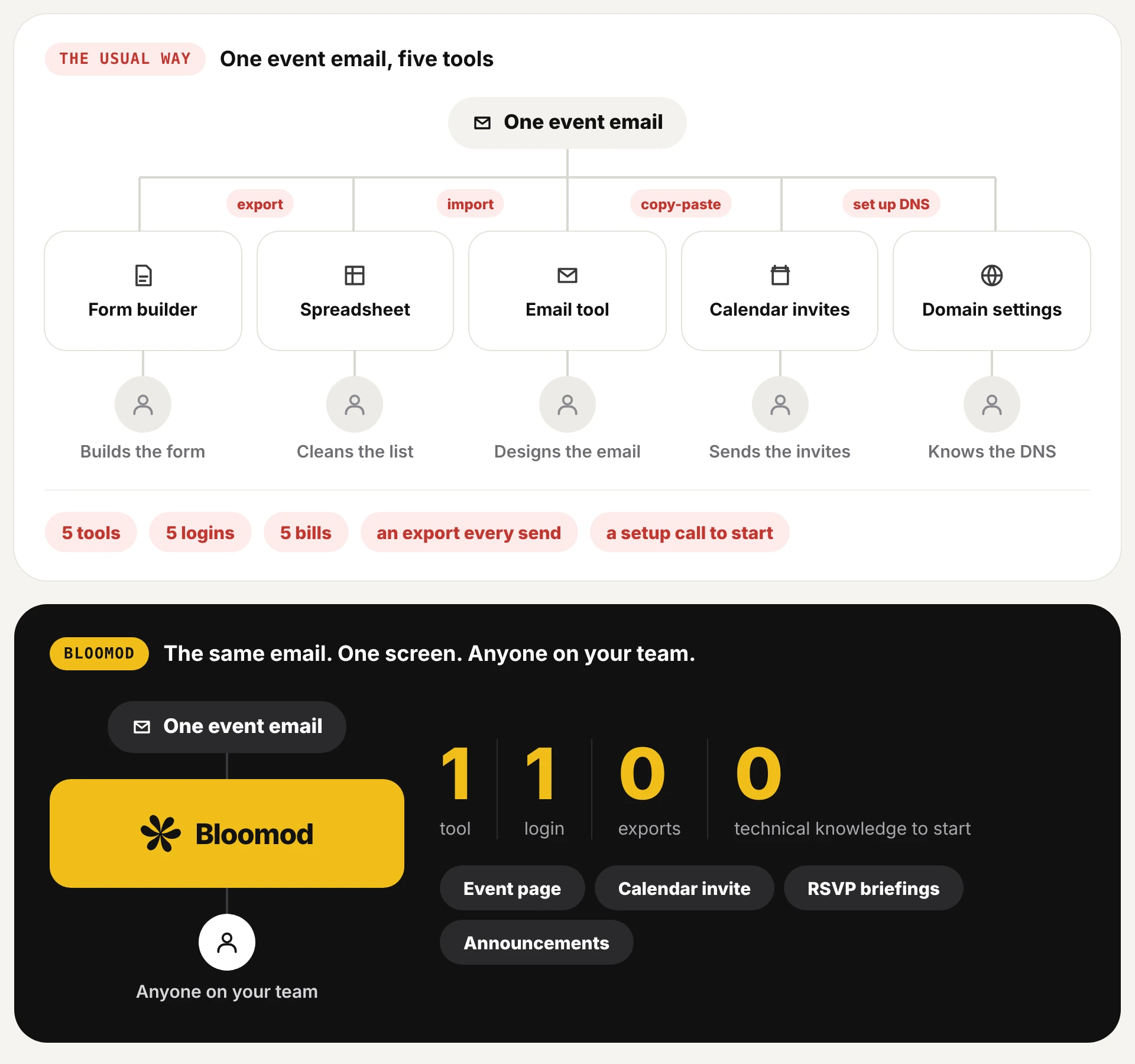
Each step lives in a different tool with its own setup and its own data. The organizer becomes the integration: exporting, cleaning and importing lists, and remembering which tool holds the latest RSVP. Some steps also need technical setup. Sending email from your own domain, for example, requires DNS records such as DKIM, and Google notes that "it can take up to 48 hours for DKIM authentication to start working." [7]
What the research says
1. Ease of use drives whether software gets adopted
The Technology Acceptance Model, one of the most cited frameworks in information systems research, found that perceived ease of use and perceived usefulness both correlate with whether people use a system. Davis's analysis also suggested that ease of use may be a causal antecedent to usefulness: if a tool is hard to use, people are less likely to see its value. [1]
For event teams: a powerful tool that needs training, setup calls or technical knowledge is less likely to be adopted, however capable it is.
2. Workers already juggle more apps than ever
- App count: Gartner's survey of 4,861 employees found the average desk worker uses 11 applications to do their job, up from 6 in 2019. Nearly half said they struggle to find the information they need. [2]
- Unused software: Zylo's 2025 SaaS Management Index, based on more than 40 million SaaS licenses, reported that organizations waste an average of $21M a year on unused SaaS licenses. SaaS spend averaged $4,830 per employee, up 21.9% year over year. [3]
3. Switching between apps costs time
- Toggling: A study published in Harvard Business Review tracked 137 users at three Fortune 500 companies for five weeks. The average user switched between apps and websites nearly 1,200 times a day. Reorientation took just under four hours a week, about 9% of annual work time. [4]
- Task switching: Experiments by Rubinstein, Meyer and Evans found that people lose time every time they switch between tasks, and the American Psychological Association notes that small switch costs "can add up to large amounts when people switch repeatedly." [5]
4. Interruptions raise stress and frustration
In a controlled experiment with 48 participants, Mark, Gudith and Klocke found that people finished interrupted tasks slightly faster but reported significantly more stress, frustration, time pressure and effort. Stress scores rose from 6.92 without interruptions to 9.46 with them. [6]
For event teams: every export, import and tool switch is an interruption to the real job of running the event. CareerCast ranked event coordinator the 6th most stressful job in America in 2019. [8]
These studies cover workplace software and office work in general, not event tools specifically. We use them to explain where organizer workload comes from, not to claim a measured result for Bloomod.
Where the organizer's workload comes from
| Source of friction | What happens at an event | What research links it to |
|---|---|---|
| Learning curve | Each tool needs its own setup, training or a setup call | Lower adoption when ease of use is low [1] |
| Tool sprawl | Registrations, emails, invites and lists live in separate apps | More apps per worker; harder to find information [2] |
| Manual hand-offs | Export RSVPs, clean them, import them, repeat for late replies | Time lost switching between apps and tasks [4][5] |
| Technical setup | Sending domains, DNS records, merge tags, segments | Waiting time (DKIM up to 48 hours) and specialist knowledge [7] |
| Interruptions | Fixing lists and re-checking tools while preparing the event | Higher stress, frustration and effort [6] |
The hidden cost is people, not subscriptions
Subscription prices are easy to compare. The time it takes people to run the tools is not.
- Every tool needs an owner. Someone has to set it up, learn it, keep the data in sync and fix it when an import fails. Across several tools, that work spreads across several people or lands on one overloaded organizer.
- Unused software is common. Zylo's data shows organizations already pay for large numbers of licenses that nobody uses. [3] A tool that's too hard to adopt becomes one of them.
- Switching time adds up. Even a few seconds per switch becomes hours a week at scale. [4]
That's why Bloomod focuses on removing steps rather than adding features. The goal is that one person, without technical knowledge, can run the whole guest journey.
The Bloomod workflow
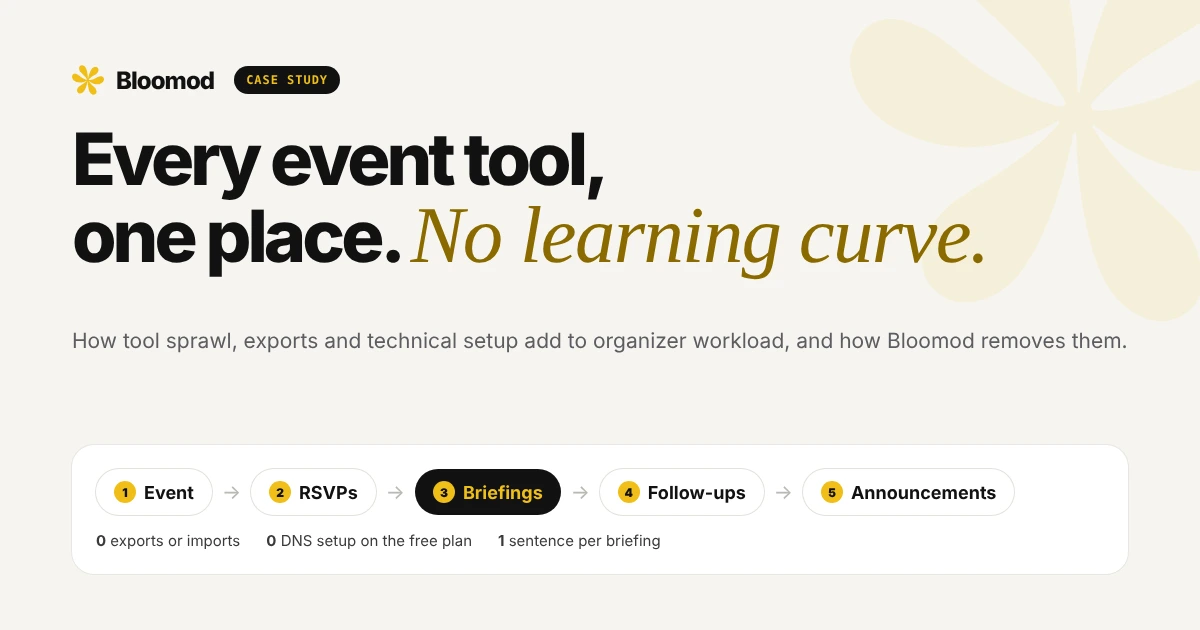
- Create the event. Add a title, date, time and place. Defaults handle the rest, including the calendar invite guests receive.
- Collect RSVPs in the same place. Guests answer Yes, Maybe or No from the calendar invite in their inbox. RSVPs land on the Attendees page live, with nothing to export.
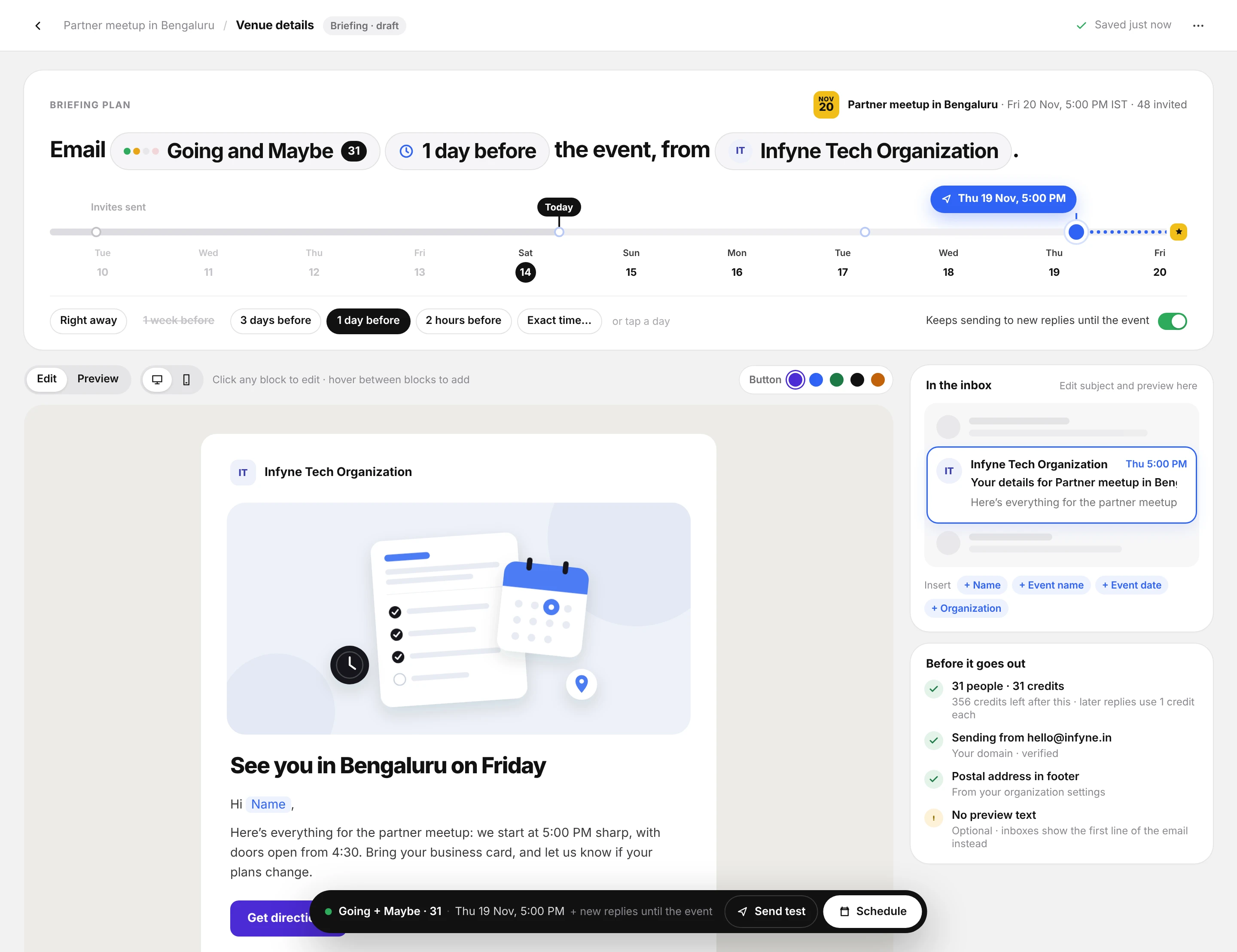
- Write the briefing as one sentence. Choose who gets it (Going, Maybe, No reply or everyone), when it goes out (for example, 1 day before the event) and who it's from. The sentence reads back exactly what will happen.
- Design the email on the same screen. Click any block to edit. Add the guest's name or event details with one click, preview on desktop or mobile, and check how it looks in the inbox.
- Schedule it. Pre-send checks confirm credits, sender and the footer address. Keep the sending window open until the event starts to include eligible late replies in the selected RSVP groups. Email Credits and delivery rules still apply.
- Follow up after the event. Send thank-you notes or recordings to the same RSVP groups, from the same place.
- Announce your next event. Send an announcement to past guests, subscribers or both, with your next event's registration link, without rebuilding the list.
No DNS setup to start. On the free Seed plan, emails go out from a Bloomod sending address, so there are no DNS records to configure. Teams that want to send from their own domain can add one on a paid plan, with help from Bloomod support.
Multi-tool workflow versus Bloomod
This comparison describes the steps involved. It is not a measured time study.
| Task | Multi-tool workflow | Bloomod | Friction removed |
|---|---|---|---|
| Collect RSVPs | Form or registration tool | Calendar invite RSVPs, tracked live | One less tool |
| Prepare a briefing list | Export, filter in a spreadsheet, import into an email tool | Pick Going, Maybe or No reply in the sentence | Export, clean and import |
| Set up sending | Configure a sending domain and DNS records | Bloomod address on Seed; own domain optional | DNS setup and waiting time |
| Design the email | Email builder, merge tags, separate preview | Click-to-edit blocks and live inbox preview on the same screen | Learning a separate builder |
| Handle late replies | Export and import again, or miss them | Eligible late replies receive the Briefing while its sending window stays open | Repeat hand-offs |
| Follow up after the event | Rebuild the attendee list in the email tool | Same RSVP groups, same place | List rebuilding |
| Announce the next event | Re-import past guests and subscribers | Send to past guests and subscribers in one click | Re-importing data |
What changes for the organizer
- A shorter learning curve. One tool and one way of working, rather than several. In the terms of the Technology Acceptance Model, the tool is easier to use, which makes its value easier to see. [1]
- Minutes, not days, to the first briefing. Writing, designing and scheduling a briefing takes about 3 minutes in Bloomod's own walkthroughs. For comparison, Google Workspace documents that DKIM authentication can take up to 48 hours after adding a key. That is provider-specific setup waiting time, not a measured comparison of active organizer work. [7]
- No hand-offs between apps. RSVPs, briefings, follow-ups and announcements share the same guest data, so there's nothing to export, clean or import. That removes the app switching research links to lost time and stress. [4][5][6]
- Less to manage. One login and one place to check, rather than several tools to keep in sync. [2]
Limits and product boundaries
- No measured customer results. This case study explains the research behind tool sprawl and learning curves. It does not report time or stress measurements from Bloomod customers.
- The research is general. The studies cover office work and workplace software, not event tools specifically.
- The 3-minute figure is an internal estimate. It comes from Bloomod's own walkthroughs of writing, designing and scheduling one briefing, not from a controlled study.
- Some teams need more than one tool. Complex ticketing, venue logistics or CRM workflows may still need other software.
- Invites are free; other sending uses credits. Calendar invites through your Google or Microsoft calendar use no credits (provider limits apply). Briefings, follow-ups and announcements use email credits according to your plan. A custom sending domain is available on paid plans.
How to measure this on your team
- Count your tools. List every app touched between registration and the next event's announcement.
- Count your hand-offs. Note each export, import or copy-paste of guest data.
- Time the first send. Measure the time from "event created" to "first briefing scheduled", including setup and waiting time.
- Ask how it felt. After each event, ask organizers to rate mental effort, stress and frustration from 1 to 10, similar to the workload questions used in research. [6]
- Compare. Run the same measures on your next event in Bloomod.
For the attendance side of the workflow, read how calendar RSVP tracking supports event show-up planning. Explore RSVP-based Briefings, Follow-ups and Announcements.
Sources
- Davis, F. D. (1989). Perceived usefulness, perceived ease of use, and user acceptance of information technology. MIS Quarterly, 13(3), 319–340. — ease of use correlates with usage and may drive perceived usefulness.
- Gartner (2023). Gartner survey reveals 47% of digital workers struggle to find the information needed to effectively perform their jobs. — 4,861 employees; 11 apps on average, up from 6 in 2019.
- Zylo (2025). 2025 SaaS Management Index. — $21M a year wasted on unused licenses on average; $4,830 SaaS spend per employee.
- Murty, R. N., Dadlani, S., & Das, R. B. (2022). How much time and energy do we waste toggling between applications? Harvard Business Review. — nearly 1,200 toggles a day; just under 4 hours a week reorienting.
- American Psychological Association (2006). Multitasking: Switching costs. — summary of Rubinstein, Meyer & Evans (2001), Journal of Experimental Psychology: Human Perception and Performance, 27(4), 763–797.
- Mark, G., Gudith, D., & Klocke, U. (2008). The cost of interrupted work: More speed and stress. Proceedings of CHI 2008, 107–110. — interruptions raised stress, frustration, time pressure and effort.
- Google Workspace Help: Set up DKIM. — "it can take up to 48 hours for DKIM authentication to start working."
- CBS News (2019). The 10 most and least stressful jobs in America (CareerCast). — event coordinator ranked 6th most stressful.
This case study explains published research on software adoption, app switching and workload. It does not claim measured results from Bloomod customers.