B2B product launch webinar
From calendar invite to demo requests.
A B2B software launch webinar for 400 invited customers and leads: one calendar invite, RSVP briefings for each group, a reminder, a follow-up and 1:1 replies, using 1,360 email credits.
A launch webinar is easy to announce and hard to fill. People register, the date is weeks away, and the webinar never makes it onto their calendar, so many forget. This example follows a fictional B2B software company, Halcyon Data, through one launch webinar in Bloomod, from the first invite to the demo requests that come after it.
The event
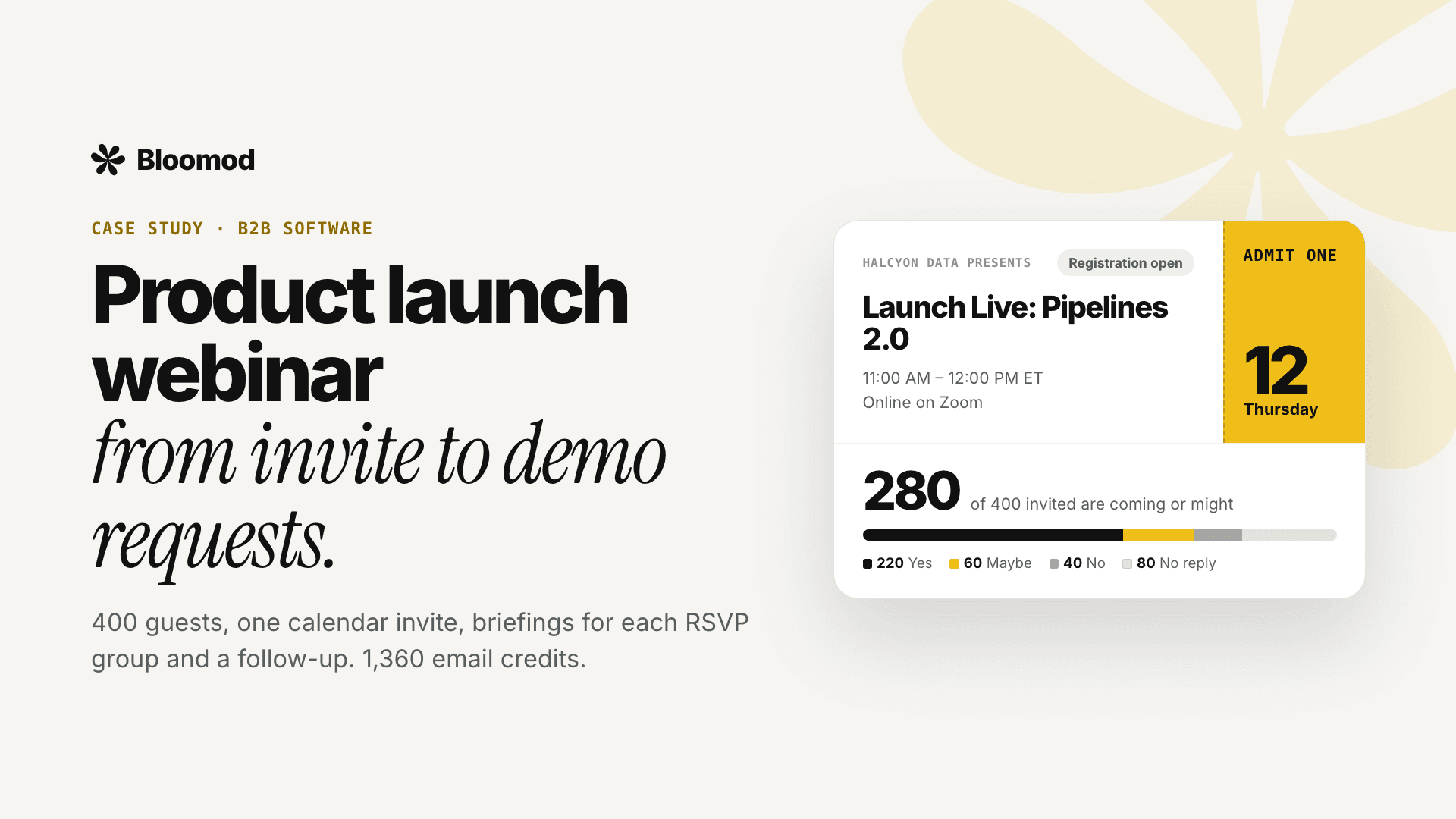
Halcyon Data’s product marketing team is launching Pipelines 2.0. In Bloomod, the whole event is one sentence: We’re hosting Launch Live: Pipelines 2.0 on a Thursday, from 11:00 AM to 12:00 PM ET, online on Zoom.
Bloomod builds the event and its public page with registration as the team fills in the title, date, time, time zone and meeting link. The team then imports 400 guests from its customer and lead list as a CSV file.
Invite: answered in the inbox
Fourteen days before the webinar, every guest gets a real calendar invitation, sent from Halcyon Data with its logo and footer. Guests reply Yes, Maybe or No in the email itself. There is nothing to download, and the webinar lands on their calendar at the right time in their time zone.
Replies are tracked live. A week later, the RSVP split looks like this:
- 220 accepted
- 60 tentative
- 40 declined
- 80 no response
The invite uses 400 credits, one per guest. Every RSVP after that is free.
Brief each RSVP group
The same RSVP counts decide who hears what next, so nobody gets a message that doesn’t fit their answer:
- 5 days before, a briefing goes only to the 80 guests who haven’t replied: “Still joining? One tap saves your seat.”
- 2 days before, the 280 guests who said yes or maybe get a briefing on what they’ll see and how to send questions in advance.
- 1 day before, the same 280 get a reminder with the join link.
Bloomod shows the credit count for each send before anything goes out.
Follow up while interest is warm
The day after the webinar, the 280 accepted and tentative guests get a follow-up with the recording and a link to book a demo.
The 40 who declined aren’t dropped. Each gets a 1:1 email from the 1:1 mailbox: “Sorry you couldn’t make it, here’s the recording.” Replies come back to the team as a normal conversation, so a declined invite can still turn into a demo request.
What it costs: 1,360 credits
One email to one person is one credit. Here is the whole webinar:
- Calendar invite, all guests: 400
- Briefing to no response: 80
- Briefing to accepted and tentative: 280
- Reminder: 280
- Follow-up with the recording: 280
- 1:1 emails to declined: 40
- Total: 1,360 credits
That fits Stem, which includes 5,000 email credits a month for $15 a month billed yearly, or $19 monthly. Stem also includes the 1:1 email mailbox used for the declined guests, and sends from Halcyon Data’s own domain with no Bloomod branding. A team running one launch a month would still have more than 3,600 credits left for announcements.
What to look at afterward
RSVPs show intent, not attendance, so treat them as a planning signal. The useful numbers after a launch webinar are how many guests replied at all, how many of the 80 non-responders answered after the first briefing, and how many demo requests came from the follow-up and the 1:1 emails.
Bloomod keeps a delivery status for every message and a full communication history for the event, so the next launch can start from what worked.
Bring them back next time
The follow-up can carry a subscribe link. Guests who opt in become subscribers, and the next launch can start with an announcement to them instead of a cold list.
See this use case step by step, explore the features or compare plans.
Halcyon Data is a sample company used to walk through the workflow; the credit counts come from Bloomod’s published pricing. An RSVP shows what a guest plans to do; it isn’t a record of who attended.